


Teacher Tips for Google Classroom - #2

Updated: 38 minutes ago
Getting more out of Google Classroom (even if you're still winging it)!

Hot on the heels of our first tips blog, here are more Google Classroom tips for beginners!
Use the ‘Question’ Feature

Hidden in plain sight between ‘Assignment’ and ‘Material’ is the ‘Question’ tool. It’s perfect for a quick check-in, discussion starter, or bell ringer activity.
Students can respond, and you can even allow them to reply to each other (or not, depending on the class vibe!).
Use it for things like:
What’s one thing you’re still unsure about from yesterday?
Which character do you relate to most and why?
Vote: Should we do the essay or the creative writing option?
Super quick. Super useful.
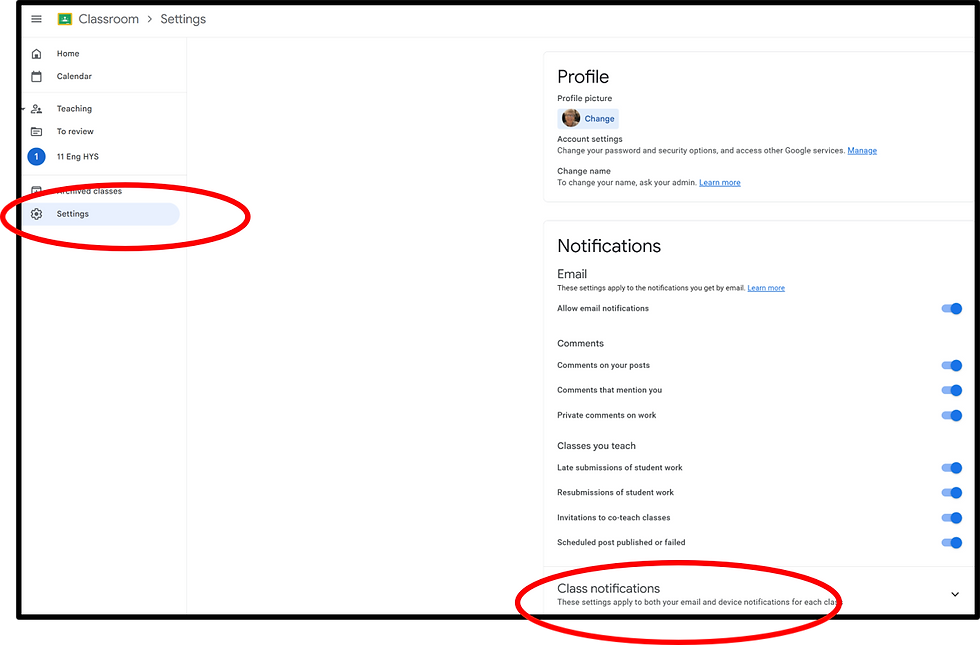
Turn on Email Notifications
I used to think email notifications were a nightmare! As the assistant head of English, I was added to all the Google Classrooms for our team. But once I figured out how to customise them properly (just head to the settings gear in Classroom, then 'Notifications'), everything changed. I turned off alerts for classes that weren’t mine and kept the useful ones like late submissions and private comments, so I could keep track without getting overwhelmed.
Apparently, if you live with ALL the tabs open, you can install the Google Classroom browser extension, and it pings you when someone submits something. I’ve never tried it…
Always Set a Due Date (Even if you don’t care when it comes in)

I used to leave the due date blank because I thought it wasn’t important, and this was just classwork. Big mistake.
Without a date, Google Classroom doesn’t show the work on their To Do list. It also shows up in their ‘Missing’ tab even if they’ve handed it in late. So confusing!
Pick a date, even if it’s flexible. I chose to have my due date as the Friday of the week I set the work. So, every piece of classwork within a week is due by the end of Friday
Use the Time Function
The time defaults to 11:59 PM, which is fine with me, end of the day and all that, but if you prefer to work to the end of the school day make sure you change the time!
Reusing Assignments (aka Reusing Mistakes)

Reusing assignments is a gift, until you accidentally assign last term’s essay… with last year’s due date… and a file that no one can open.
Here’s my checklist:
Check the due date.
Check the topic (no one wants “Week 3 - Poetry” showing up during your dystopian novel unit).
Check the file. Always.
Bonus: I now put “[Updated for 2025]” in the instructions so future me doesn’t cry.
Finally…
Google Classroom isn’t perfect, and it doesn’t have to be. What matters is that it works for you and your students. Take some time to explore the features, customise the settings, and find what makes your life easier.


STAY IN THE KNOW!
✿ Subscribe to our YouTube channel
✿ Follow us on TikTok
✿ Follow us on Instagram
✿ Follow our Facebook page
✿ Follow us on TPT.
📬Add some joy to your inbox📬
🥝 NZ Teachers, click here to subscribe for teaching tips and our latest products (or log in to the website then you can access our Freebies library too)!
🌎 Teachers from other parts of the world, click here to subscribe for teaching tips and our latest plus get instant access to our bank of freebies!


These Google Classroom ideas are so practical for busy teachers. The Mini Hints shared here make everyday tasks like setting due dates, using the Question feature, and managing notifications much easier. I especially like the reuse checklist—such a simple way to avoid mistakes and stay organised throughout the school term.